
Free resource library
Free resources. Useful progress.
Plan your next lead magnet, review your draft and explain its value. Practical downloads for consultants and small agencies.
Start with the task you need to complete.
What would help you move forward?
Pick the resource that matches the work in front of you.
I have an idea
Build a focused brief: one reader, one task, approved sources and a format. Use the Brief Builder.
I have a draft
Check sources and claims before anyone relies on them. Use the Source and Claim Review Checklist.
I'm ready to share
Write a clear resource page, social post and delivery email. Use the Promotion Copy Template.
I sell a defined service
Draft a five-check client scorecard with honest score bands. Use the Consultant Diagnostic Launch Kit.
I want to see a finished example
Open three fictional sample bundles: brief, lead magnet, page copy, emails and a source report.
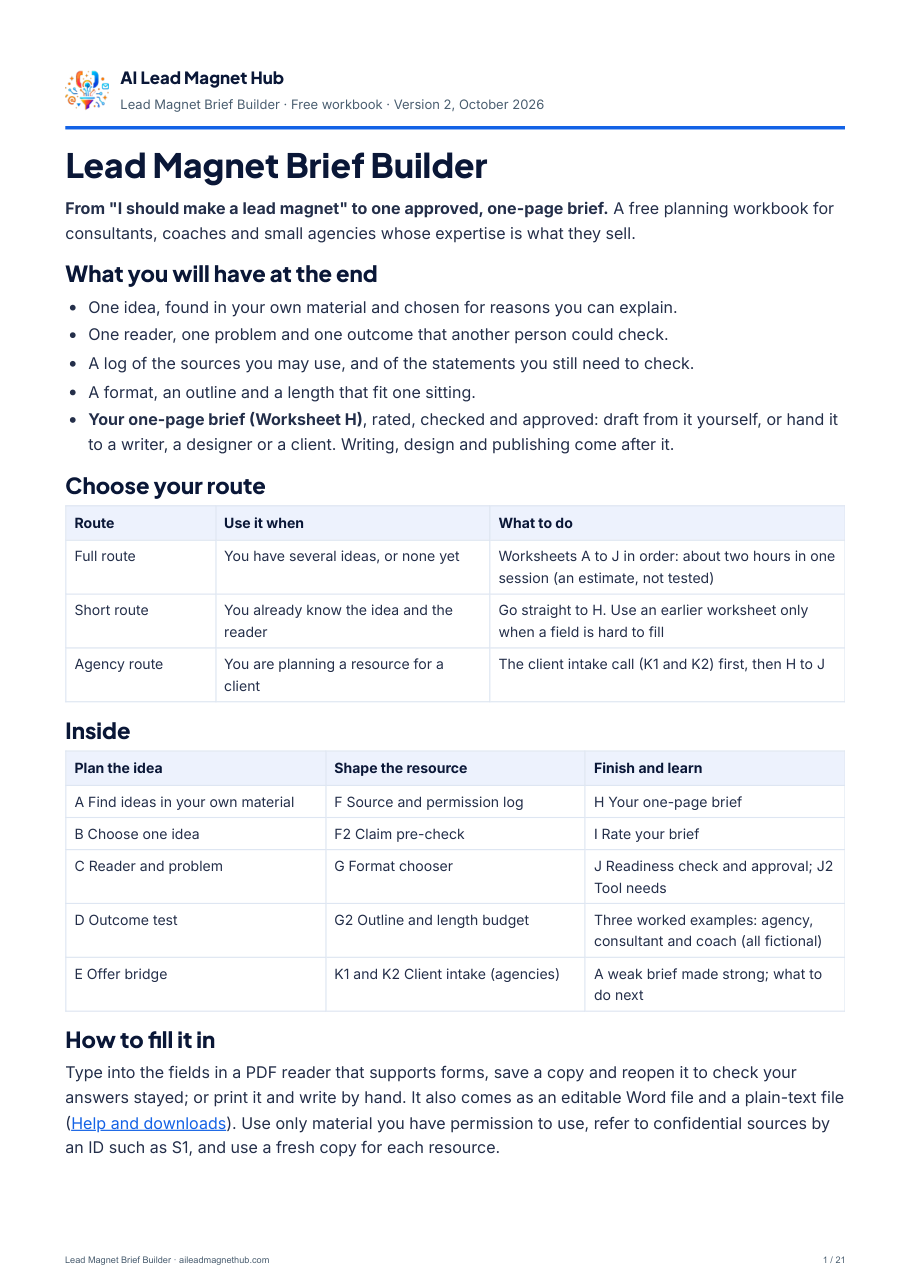
Lead Magnet Brief Builder
Turn a broad idea into one reusable brief for a checklist, worksheet or short guide.
Inside the workbook
- Reader and problem worksheet
- Approved-source map
- Three format patterns
- Completed agency example (illustrative)
- Reusable one-page brief
- Ten-point readiness check
Start with Worksheet A: find ideas in your own material, or go straight to the one-page brief on Worksheet H.
Two more free starting points.
A scorecard kit for consultants with a defined service, and finished sample bundles to learn from.
Consultant Diagnostic Launch Kit
For a consultant with a defined service: turn your offer into a short self-assessment a prospective client can complete.
What you get
- An offer-to-problem sentence and five observable checks
- Honest score bands and reader messages
- A completed fictional example
- An online scorecard maker and a launch checklist
Sample campaign bundles
Three complete, fictional campaigns: an agency kickoff checklist, an HR consultant's new-manager plan and a fractional CFO's cash review worksheet.
In each bundle
- The one-page brief and its source notes
- The finished lead magnet
- Landing-page copy and five email drafts
- A source report tracing every claim
Two more useful tools, also free.
Use either download on its own, with any editor.
Source & Claim Review Checklist
Review an existing draft and decide what to support, verify, revise or remove.
What you get
- Ten source and permission checks
- A decision rule for uncertain wording
- A worked review example
- Three claim-review records
Start with one draft and its supporting sources.
Download the checklist (PDF)Promotion Copy Template
Write a useful resource-page message, social post and delivery email.
What you get
- Resource-page copy fields
- Social-post and delivery-email templates
- A complete example using the Brief Builder
- A plain-text version for any editor
Start with a finished resource and one reader.
Download the template (PDF)Which one to start with.
Match the resource to the task you need to finish this week.
| Your task | Start with | Format and access |
|---|---|---|
| Decide what your next lead magnet should be | Lead Magnet Brief Builder, Worksheets A to E | 21-page fillable PDF, Word and text; email request |
| Build a client diagnostic for your consulting offer | Consultant Diagnostic Launch Kit | 10-page PDF, editable DOCX and an online scorecard maker; email request |
| Brief a colleague, freelancer or client team | Lead Magnet Brief Builder, Worksheet H (agencies: K1 and K2) | 21-page fillable PDF, Word and text; email request |
| Check a draft written with AI assistance | Source & Claim Review Checklist | 2-page fillable PDF; free with your email |
| Sign off a client resource before it goes live | Source & Claim Review Checklist, page 2 | 2-page fillable PDF; free with your email |
| See a finished campaign before you start | Sample campaign bundles | ZIP with PDFs and editable text; free with your email |
| Write the page, post and email for a finished resource | Promotion Copy Template | 3-page PDF plus editable text; free with your email |
All five are free and useful on their own. You can use them in any order.
Open it. Make it yours. Save your progress.
Open
Use a PDF reader that supports fillable forms.
Complete
Type into the fields, or print and write by hand.
Save & check
Save a copy, then reopen it to confirm your answers remain.
Use material you have permission to use. Keep private client information out of shared files; refer to confidential sources by an identifier instead.
If a download does not work
- The PDF opens in your browser instead of saving. Use your browser's download or save option, then open the saved file in a PDF reader that supports forms.
- Your typed answers disappear. Some viewers display forms but do not save them. Save a copy from a reader that supports fillable forms and reopen it to check.
- You closed the Brief Builder page before downloading. Use the link in your delivery email, or request the workbook again.
- The editable text shows on screen. Save the page as a .txt file, or copy the text into your editor.
Still stuck?
Our help page covers opening, filling and saving each PDF, and email preferences.
If a file is missing or broken, tell us through the contact form.
A few useful things to know.
Do I need a paid product?
No. Each resource can be used on its own, with your own editor and email tool.
Which resources ask for an email address?
All five. The Brief Builder and the Consultant Diagnostic Launch Kit are sent after an email request, like the Source and Claim Review Checklist, the Promotion Copy Template and the sample bundles. They all work the same way. Enter your email and press “Send my confirmation email”, then reply VERIFY to the short email we send you, so we know the address is yours. We then email you the resource. Then come a few follow-up emails, and then they stop: three over about nine days if you asked for the diagnostic kit, or, for any of the other four resources, four over two weeks on using the Brief Builder. The last one names our own $79 Workflow Pack, and every email has an unsubscribe link.
What emails come with the workbook?
First we send a short email; reply VERIFY to it and we email you the workbook, then four short follow-up emails over two weeks on using it (the last one names our own $79 Workflow Pack). Every email has an unsubscribe link at the bottom.
Want to see the result first?
The completed examples show an approved input, its brief and the finished checklist side by side.
Choose one task. Leave with a useful next step.
Still deciding what to create? Start with the Brief Builder. The checklist, the promotion template and the sample bundles are free to download with your email whenever you need them.
Free: we send you a short email first. Reply VERIFY to it and we email you the workbook, then four short follow-up emails over two weeks (the last one names our own $79 Workflow Pack). Every email has an unsubscribe link.